Wednesday, October 27, 2010

week 5 !!


During this weeks lesson we learnt how to add a button in which when the mouse performed specifics actions over the button the button responded.This is because we added text to the button in relation to the positioning of the mouse for example UP,DOWN,OVER,HIT.Using the codes we then created it so that when the button was pressed a message appeared saying that the button was pressed.

circlebutton.addEventListener( MouseEvent.MOUSE_UP, handleMouseUp);
function handleMouseUp(evt:MouseEvent):void
{trace("Button was pressed");
circlebutton.scaleX=2
circlebutton.scaleY=2

}

This is an example of the codes that i was using in todays lesson.
The scale x and y refers to the shape of the circle ie how big or smaller it will get.

Secret


I have finalised that i want the location of the event and details to be secret for a specific amount of time as this will be more successful as people will be eger to know the details.This sort event i aim at the younger generation such as 18- 30, as i feel that older people may not be interested in the 'boozing' lifestyle as they may be a more sophisticated genertaion that prefer pubs etc.

Adobe


As i am not very knowledgeable with the adobe software i am learning new things everyday.I find the techniques very hard to remember yet i am really intreuged within the siftware.In other lessons i have used adobe after effects in which i find very similar to adobe flash which im finding very useful in aiding my designs.

Wednesday, October 20, 2010

week 4 !!


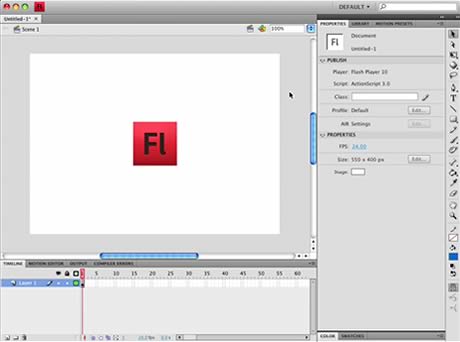
During todays lesson we were introduced to Adobe flash professional, in which were shown how to do multiple things.Personally i found this really hard to do as i was quite confused as to what we were actually doing.I feel as though its given me a basic knowledge of the programme however i would feel comfortable using it on my own as i would get confused with all the data and codes that you have to enter.

The top picture shows the task that i completed during the lesson in which it includes objects and letter that when you press the enter key they move into this particular set up.I found this really intreuging and i like this.I find flash alot easier to use than dreamweaver as i feel at the moment im more confident in what the buttons do and simple tasks.

Wednesday, October 13, 2010

Dreamweaver


We completed a task in class in which we created our own web design on dreamweaver,i found this very interesting to do as i havn't ussed dreamweaver before.

Above is the background in which i created for my webpage,i wanted a grunge effect so used objects that i felt could reflect this such as paper,paperclips, treasure chest.All of which were conforming with the dark rustic colours,so that the whole page would be consistent.

At the top is the treasure chest that i used within my design,i like the way in which i have encorporated this into my design.I like the suttle colours.

Week 3!!

In todays lesson we looked at different styles of websites and how the style can effect how the user interacts with them.We looked at simplistic sites and more complex sites.

http://www.smashingmagazine.com/2010/05/04/web-design-trends-2010/

This is the site in which we looked at other sites.I found this site very inspiring as it gave me alot of ideas as to what a website can look like and how you can adapt the functions of the website to suit you.

http://www.thinkingforaliving.org/ - this website is simplistic yet intreuging to look at as you don't scroll up and down you scroll side to side which i've never seen before.

http://evandinsmore.ca/ideas/twentyone - I really like the way in which the type has been set out to create images.I feel that type is really important in keeping the reader engaged.

Tuesday, October 12, 2010

week 2!!


For our task in the lesson we had to create our own website in which the details of our event were displayed.The website that we used was called weebly in which i found really easy to use and pick up quite quickly enabling me to actually get on with work unlike photoshop as i am not too knowledgeable with the programme.
The website allow you to add your own images,videos and posts about surrent events.You can also have as many pages as you want which i found really interesting.I like the fact that you can manipulate the templates that they set out for you to make it more personal.The designing process makes the event seem more realistic and think about the smaller details of the event.

www.weebly.co.uk

http://naomicaird.weebly.com/ - This is the link to my website that i've created on weebly.

Wednesday, October 6, 2010

micheal jackson flashmob


Another example of a flash mob video in which people join in the event one by one untill there are hundreds of people.

I really like the idea of the event slowly unfolding right in front of your eyes as you wouldn't expect it to happen,however when i create my event not many people will be able to see the event unfold yet from a distance you will be able to see all the lights and glowing colours on the hills from a distance away for example from the other side of the river,from up above etc.

Links


This is an example of people dancing to a specific song, i like the way in which the areil shots capture everyones movements like a wave.I feel this could look really interesting with uv paint and in the dark.

Examples !


(top left )- An example of a promotional leaflet for a uv rave/party. I like how bright and contrasting the bright colours are against the dull background colours.


(top right ) - an example of where i could hold the event at Greenwich park ,i think the big open space and the fact that its on a hill will create a really interesting movement when everyone dances


UV/Glow in the dark rave


For the location of the rave, i'd like it to be in an open space so that from an ariel view it will be full of moving flouresent lights. I like the idea of using flouresent clothing,paints and glowsticks.To access the rave people will need to be in floursent colours.
(left) - An image of how uv paint looks in the dark
http://www.facepainting.net/GalUV.htm - a link as to what people can create with the paints